




As Khaleej Times reported in October 2026, a senior UAE government cybersecurity official warned that the biggest danger with AI agents is an attacker steering one into an action that appears authorized, and that agents left running after deployment without oversight are where serious problems arise. The same worry reaches every CISO weighing agentic AI human risk management: which decisions in a human risk program can an agent make alone, and which must wait for a person? This post is for security leaders in the UAE and wider GCC who own that program and need a line they can defend to their board and their auditors.
In short: Let agents handle reversible, low-stakes actions such as nudges, training assignments and scheduled recalculations. Keep step-up controls, finance holds and policy decisions with named people, and widen the agent's autonomy in stages as its audit log earns your trust.
What Agentic AI Human Risk Management Does
Agentic human risk management means software agents that watch risk signals about people and act on them, instead of waiting for an analyst to open a dashboard. The signal might be a failed simulation, a risky sign-in or a policy nobody acknowledged. The agent picks a fitting response and carries it out, which is the difference between a system that acts and a report someone still has to read.
Vendors label this AI human risk automation or autonomous human risk management, and the labels cover a wide range of behavior. The NIST AI Risk Management Framework notes that human-AI configurations can span from fully autonomous to fully manual, and that some systems specifically require human oversight. Your program sits somewhere on that range, and you decide where.
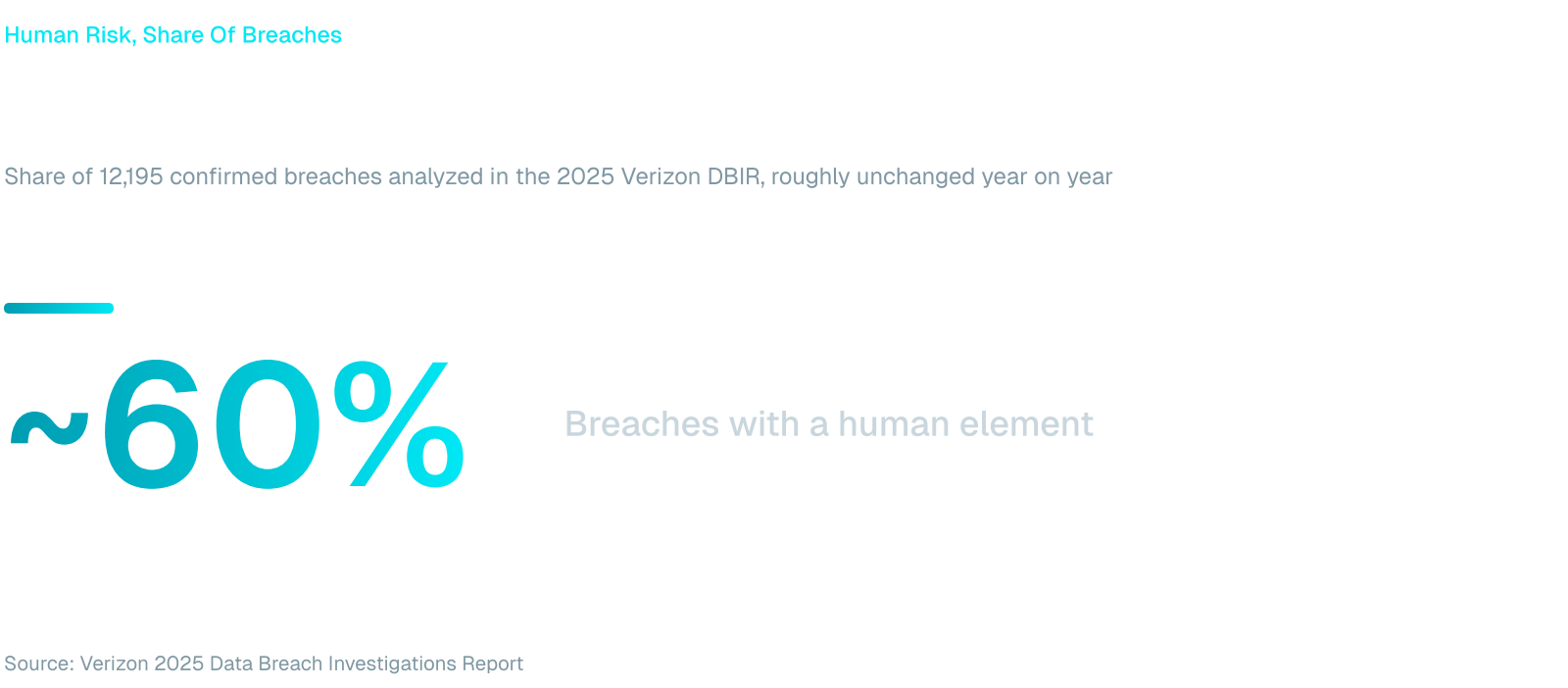
The reason to bother is the size of the target. The 2025 Verizon Data Breach Investigations Report analyzed 12,195 confirmed breaches and found the human element involved in about 60% of them, roughly unchanged from the year before. Following up with every employee by hand does not scale to that, so part of the response has to run without waiting for a person.
What Agents Can Safely Automate
Deciding which part is simple to state and harder to apply. An action is safe to hand to an agent when it is reversible, low in stakes for the employee and easy to explain to that employee afterward. Five kinds of work usually pass that test:
- Assigning a nudge, micro-lesson or video after a failed simulation or a risky event.
- Notifying an employee's manager or a role group.
- Adjusting each person's next simulation, such as difficulty and timing, within limits an administrator sets.
- Running scheduled work such as risk score recalculation, executive reports and policy re-attestation.
- Drafting a rule for an event no existing rule covers, for an approver to review.
In Fraus, the agentic AI in Odin recommends or assigns training, policies and controls, and Codex delivers the short lessons in Arabic and English. Simulation is where the pattern is clearest. Graybait lets agentic AI pick each employee's next simulation from their Human Risk Profile, set its difficulty and timing, and retire a method once that person has beaten it, so the team steps in only when the system asks. The post on autonomous phishing simulation covers that model in more detail.
What these actions share is a mild worst case. If the agent gets one wrong, an employee receives a lesson a few days early or late, and an analyst can see why in the log.
What Stays With People
The harder question is where the agent stops. Actions that change what an employee can do, or that sit in the path of money, belong to a person.
In Fraus, higher-stakes actions such as step-up MFA or a finance approval hold always wait for analyst approval. That is a rule worth copying in any program, because those actions can stall a payment run or lock someone out on the day they need access.
Some decisions stay with people even where no tool forces the pause. Deciding whether a run of failures points to a training gap or to a workload problem takes context an agent does not have. Anything with HR or disciplinary consequences needs a named owner. So does the risk appetite the agent works inside, which your CISO and the business set, not the software.
UAE policy points the same way. The UAE Cyber Security Council's National Cyber Security Policy for Artificial Intelligence lists ensuring human oversight in critical decision-making among its operational safety measures, which gives you a policy reference when you explain these gates to an auditor.
The manipulation risk the UAE official described applies to a human risk agent as well. An agent that acts on signals can be fed misleading ones, so approval gates and logs protect you when an attacker makes a harmful action look routine.
Grant Autonomy in Stages
Since the line moves as trust builds, start narrow and widen the agent's room only when its record supports it. The Agentic Automation Rules in Fraus are built for that. Rules your administrators write cover the events you expect, and before one goes live, the test before you trust step simulates an event so you can see what the rule would do.
For events no rule covers, agentic AI writes a contextual rule and acts in one of three modes. Off takes no action. Supervised has approvers confirm by email. Unsupervised starts after a 30-day trial in which the agent still asks first. Admin rules take priority, every rule is labeled by origin, and every agentic action is logged for audit.
Odin also proposes ready-to-apply rules with estimated 30-day matches and its reasoning, which gives approvers something concrete to judge. For organizations with residency rules, Fraus can be hosted on UAE or GCC servers or deployed fully on-premise, so the data behind those decisions stays where your policy requires. Placing the agent inside your program's phases and owners is covered in the human risk management framework post, and the rule-building steps are in the one on security awareness automation.
Start With One Low-Stakes Rule
The official's concern was agents running without oversight, so the practical answer is oversight designed in from the first day. A small pilot shows you how the agent behaves before the stakes rise.
- Pick one reversible action, such as assigning a micro-lesson after a failed simulation.
- Run it in Supervised mode for one department and name who approves.
- Review the audit log every week for the first month.
- Write down the actions that will never run unsupervised, and get that list signed off.
After the month, you will know whether the agent's choices match what your analysts would have done, and you can widen the audience or move one rule to Unsupervised with evidence in hand.
Frequently Asked Questions
What is agentic AI human risk management?
It is human risk management in which AI agents act on risk signals about employees, such as assigning training, adjusting simulations or notifying managers, instead of only reporting them. People set the guardrails, approve higher-stakes actions and review the log. The agent handles routine response at a pace analysts cannot match by hand.
Can an AI agent run a human risk program without people?
It can run the routine parts, such as lessons, nudges and scheduled recalculations. It should not own decisions with money, access or HR consequences, or the risk appetite it works within. A sound design keeps named people for approvals and uses the audit log to review what the agent did.
Which actions should always need human approval?
Anything that changes what an employee can do or touches payments should wait for an analyst. In Fraus, step-up MFA and a finance approval hold always wait for analyst approval. Add to that list any action with disciplinary weight, and keep it written down so auditors can see it.
How is autonomous human risk management different from a rules engine?
A rules engine acts only on events someone wrote a rule for. In Fraus, agentic AI also writes a contextual rule for events no rule covers and acts in Off, Supervised or Unsupervised mode. Unsupervised begins after a 30-day trial in which it still asks first, and admin rules take priority.