


Picture an accounts payable clerk who clicks a message that looked like a payroll notice and lands on a page saying they failed. By the next morning half the department has compared notes, and what they remember is the embarrassment, not the lesson. This guide sets out phishing simulation best practices for the security awareness manager who owns a phishing simulation program in a GCC organization and wants staff to trust it.
In short: Write the plan and guardrails with HR first, tell staff the program exists, keep lures realistic but never cruel, raise difficulty person by person, coach at the moment of the click, and reward reporting.
Phishing Simulation Best Practices Start With a Plan
A phishing simulation program begins as a short written plan, not a first campaign. Name the risk you want to reduce, the groups you will cover, who approves each lure and who may see individual results. NIST SP 800-50 Revision 1 ties awareness and training to an organization's risk objectives and covers how to assess their impact. Every simulation in the plan should trace back to a risk you named.
Agree the guardrails in the same document. HR and legal should sign off on topics that are off limits, groups that are excluded, how long results are kept and who sees them. Decided once and in writing, these rules are not up for debate on the day a senior manager clicks.
Then decide who goes first. Finance staff, executive assistants, IT administrators and anyone who approves payments face different lures from the rest of the company, so give them the earliest and most specific attention.
How to Run a Phishing Simulation Fairly
Tell people the program exists. Announce it in the security policy and at onboarding, in Arabic and English, and say plainly that simulations are training, not a disciplinary test. You do not announce dates, which would defeat the exercise, but nobody should discover the program by being caught by it.
Keep lures realistic, not cruel. A fake bonus notice, a redundancy letter, a medical result or a family emergency will get clicks, and it will also cost you the goodwill the program runs on. Use the lures attackers actually use against a business: parcel notices, shared-document requests, supplier invoices, helpdesk resets, MFA prompts and QR codes on posters.
Do not name and shame. Individual results go to the person and, where agreed, to a coaching conversation. Reports to leadership show departments and trends, never a list of the worst clickers. A person who expects to be listed learns to hide a mistake, and a hidden mistake is the one that becomes an incident.
Match the language. A lure in a language the employee does not read at work tests their reading, not their judgment. These phishing training best practices only hold if each person is tested in the language they actually use.
Set a Cadence and Raise Difficulty Slowly
Cadence is a balance between repetition and fatigue. One annual test teaches little, and a weekly blast teaches people to ignore the sender. Give everyone a steady baseline, spread sends across days and hours so colleagues cannot warn each other across the room, and then let frequency follow risk.
Difficulty should climb person by person. Start with lures that have visible tells, such as a mismatched sender or a generic greeting. Once someone spots those consistently, move to lures that use their role, their suppliers and their calendar, and then to channels beyond email. Whitebait supports that progression with Arabic and English templates and AI-recommended campaigns, including MFA bypass, QR code and credential harvesting scenarios.
A fixed campaign calendar is hard to keep personal at scale. Graybait runs the program without campaigns: its agentic AI picks each employee's next simulation from their Human Risk Profile, raises difficulty as they keep spotting attacks, retires a method once that person has beaten it, and sets frequency by individual risk within the limits you set. The post on autonomous phishing simulation explains how that model works.
What Happens After a Click
The moment after a click decides whether the exercise teaches anything. Replace the failure page with a short, calm explanation of what gave the message away, what to do next time and how to report. Keep it to about a minute, in the employee's language, with no scoring language.
Training works best when it arrives at that moment. Zero-Touch Training in Fraus responds as soon as a person shows a risky behavior, with training matched to it and no manual step, delivered inside Microsoft Teams in the flow of work.
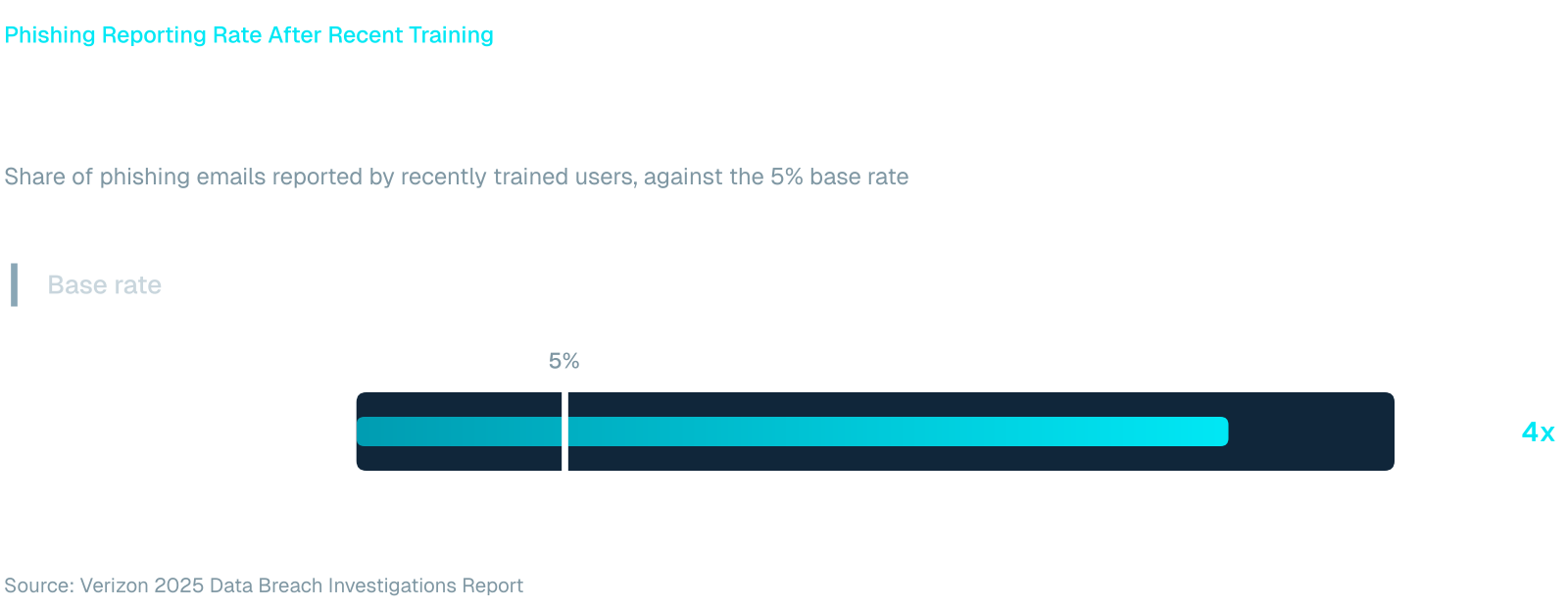
Reporting is the behavior to reward. In the 2025 edition of the Verizon Data Breach Investigations Report, users who had more recent training reported phishing emails at about 21%, against a base rate of 5%, roughly four times higher.
So thank people who report, including those who click first and report second. Send an automatic acknowledgment that tells them what they caught. The person who raised a hand should never be the one who has a bad week, and your reporting rate depends on that. The post on phishing simulation metrics shows how to read reporting rate next to click rate.
Tell Staff What the Results Mean
Publish what you learn at least once a quarter, in plain language: how many people reported, how fast, which lure types were hardest and what you are changing because of it. Staff accept a program that shows its working, and leadership gets the same figures in a form they can act on.
Treat repeat clickers as a coaching question first. Look at the role, the workload and the lure before the person, and offer more support before any manager conversation. Escalate to a manager only under a rule agreed with HR in advance, so the response is the same for a director and for a new joiner.
Start With a Fair Pilot
Return to the clerk from the opening. The click is the same, but the page they land on explains the tell in a minute, a short lesson follows in Teams, and the department already knew a program like this existed because you told them. That is the program you are aiming for.
Pick one department, write the plan and guardrails, announce the program and run a 30-day pilot. Review reporting rate, time to report and repeat behavior before you widen it. If you are still choosing a platform, the post on what to check before you buy covers the questions to ask.
Frequently Asked Questions
How often should we run phishing simulations?
Set a steady baseline that every employee receives, then adjust by risk. Roles such as finance and administrators get more frequent and harder simulations, while people who consistently report get harder ones as they improve. Avoid fixed weekly blasts, spread timing so colleagues cannot warn each other, and review the cadence after the first quarter against reporting rate and time to report.
Should employees know about simulations in advance?
Yes about the program, no about the dates. Announce it in the security policy and at onboarding, in Arabic and English, and explain that simulations are training and not a disciplinary test. Staff who know the program exists and trust how results are used report more freely than staff who feel ambushed by it.
What should happen when someone clicks?
They should see a short explanation straight away that shows what gave the lure away, what to do next time and how to report. Follow it with training matched to the behavior. No public list, no scolding, and no manager conversation unless a rule agreed with HR in advance applies.
Who should see individual results?
The employee, the security awareness team and, under rules agreed with HR beforehand, the person's manager for coaching. Leadership reports should show departments and trends. Fix the retention period for results in the written plan, so nobody has to decide it after an awkward click.