Fraus is an AI-powered next-generation Human Risk Management platform that continuously detects, simulates, and reduces human cyber risk through zero-touch automation. Built for organizations across the UAE and the wider GCC.
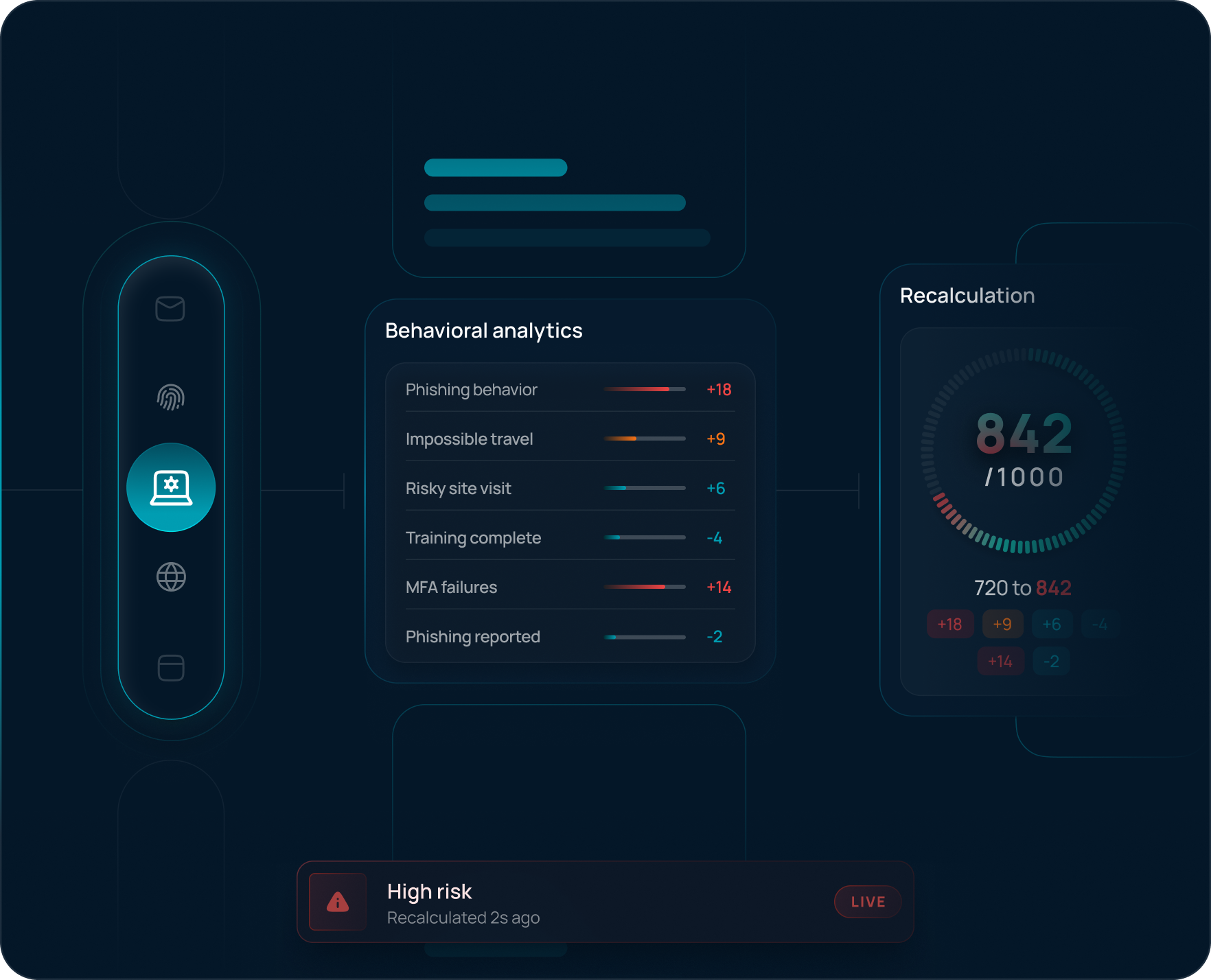
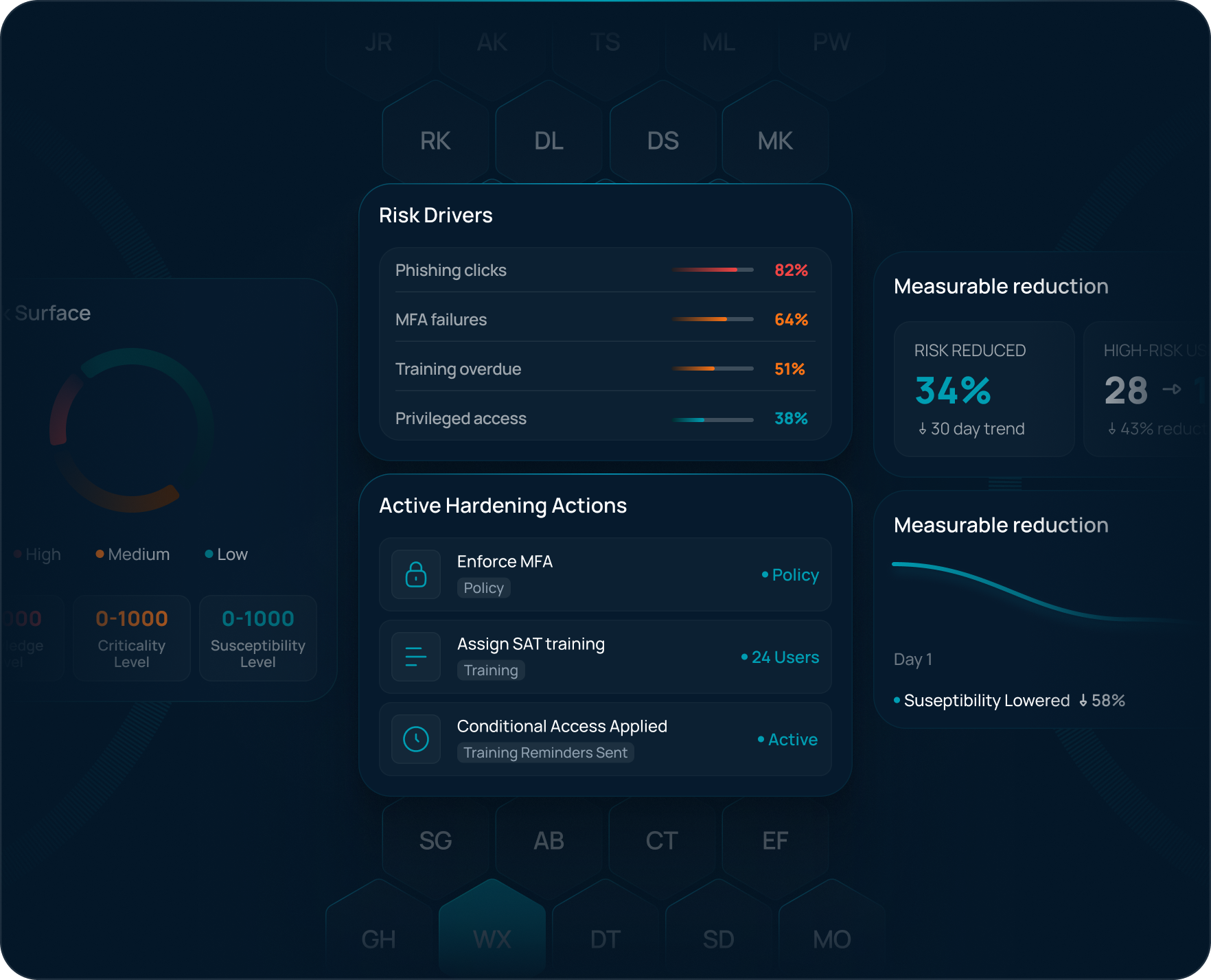
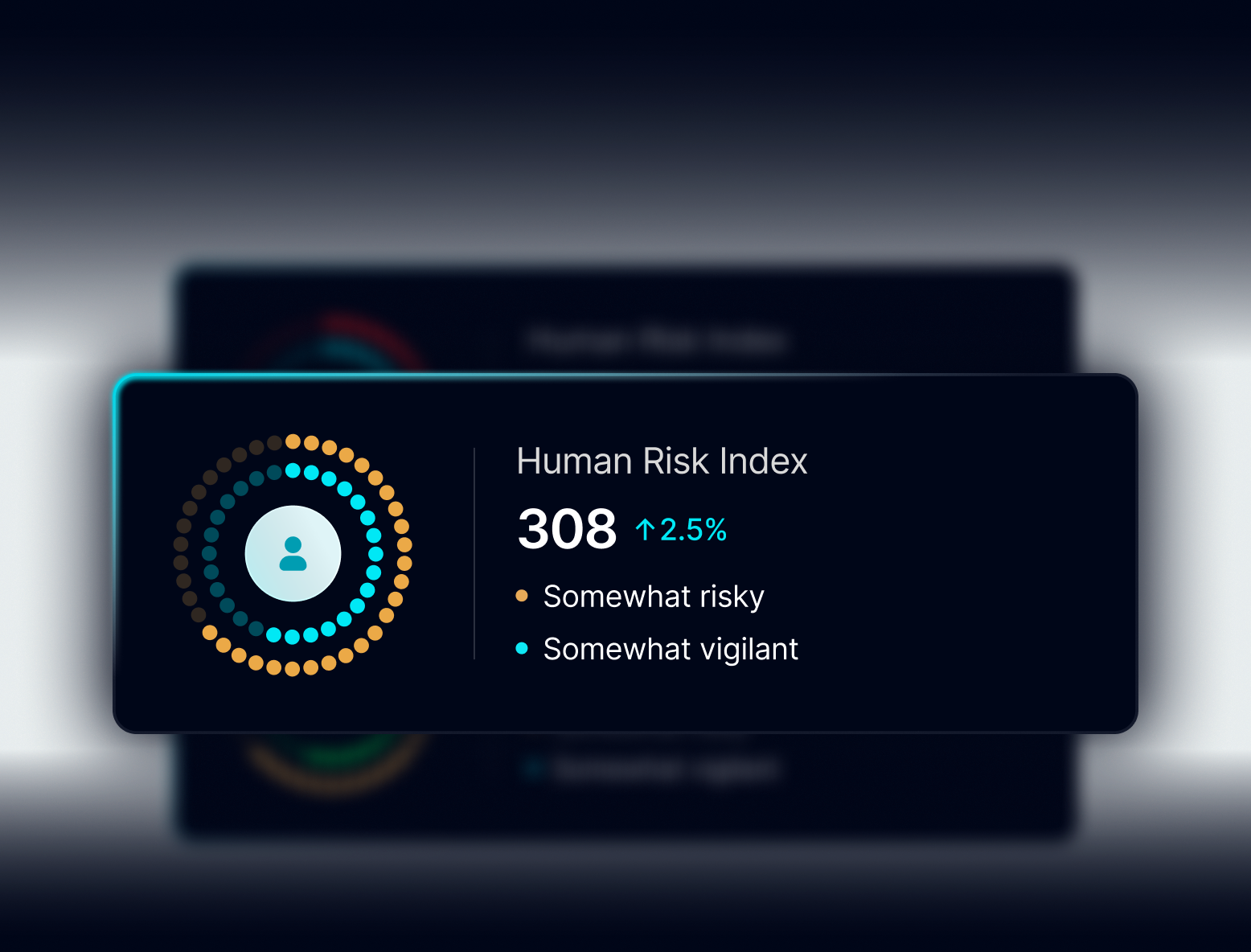
Continuously recalculates user risk scores based on evolving behavior, user criticality, role, privileges, exposure patterns, and many other real-time security signals.
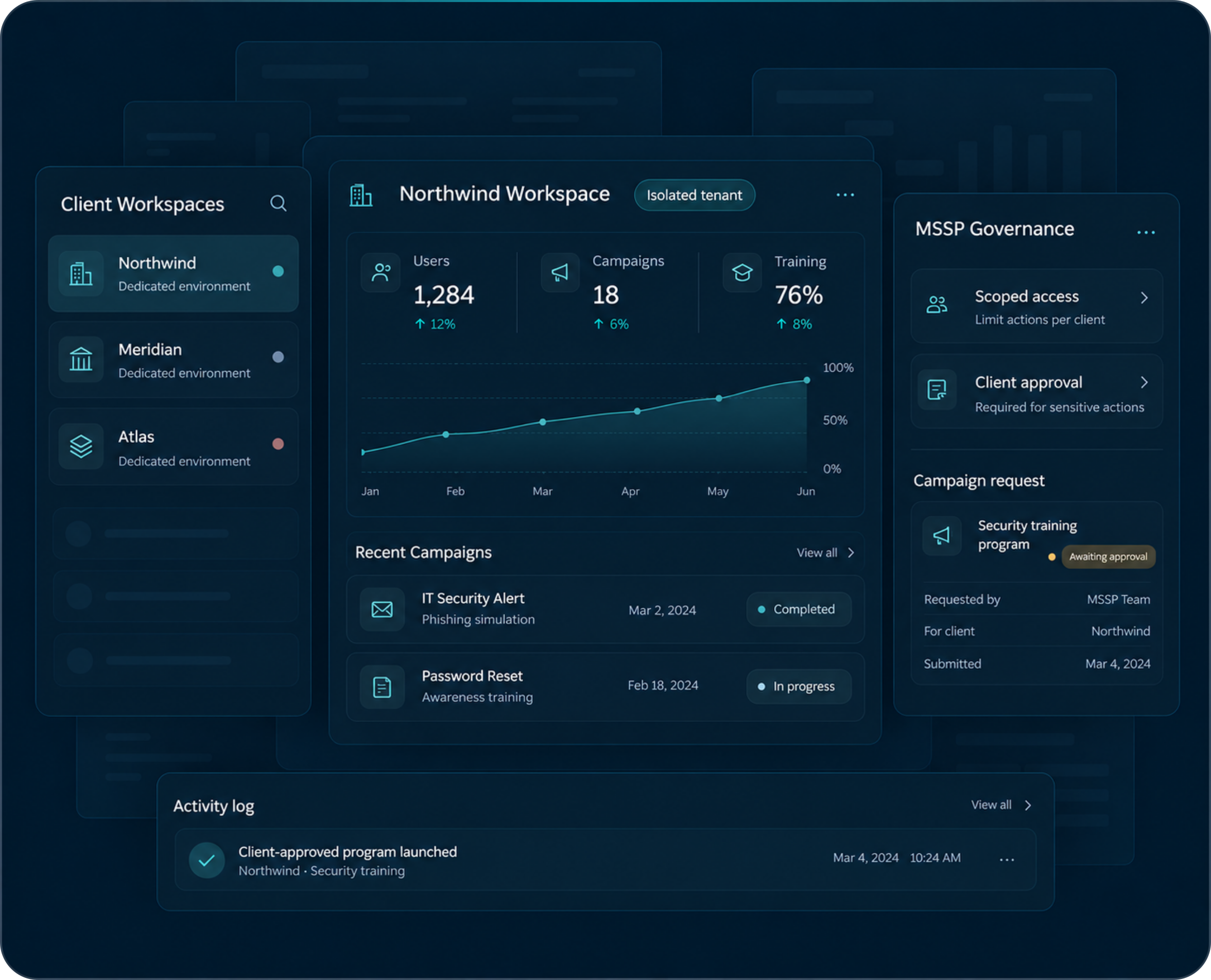
Run Fraus for one organization or many. Multi-tenant deployments give each client or entity its own environment, and MSSP governance and approval workflows let service providers run human risk programs on their clients' behalf.
Automatically reduces human risk by identifying vulnerable users and applying targeted controls, training, and access restrictions to minimize real-world attack exposure.
Signals from your existing security tools in one view
Risk rolled up by team, department and business unit
Stakeholders notified automatically about high-risk users
Unified visibility across identity, email, cloud, collaboration, and security ecosystems.
360°
Risk Visibility
Real-time human risk intelligence with continuous behavioral monitoring and adaptive insights.
100%
Vendor-Agnostic
Designed to integrate seamlessly with any existing security stack, cloud, or infrastructure.
12+
Signal Categories
Correlating behavioral, identity, communication, and operational signals into actionable risk context.
The Era of Static Security Awareness Is Over
Continuous behavioral risk detection and autonomous intervention are replacing scheduled campaigns and static training.
Human Risk Profiling
Insights into Human Behavior for Smarter Risk Management
Behavioral Risk Measurement
A Data-Driven Approach to Evaluating Behavioral Risks
Seamless Integration
Connecting Systems Effortlessly for Better Performance
Agentic AI-Driven Phishing
Evolving Social Engineering with Autonomous AI Systems
LLM-Powered Analytics
AI-Driven Insights for Better Decision Making
Executive Dashboards
Empowering Leaders with Actionable Data
Zero-Touch Automation
Fully Automated Workflows with No Human Intervention
Continuous Risk Analytics
Ongoing Insights to Detect and Mitigate Risks Early
Cross-Channel Simulation
Modeling User Behavior Across Multiple Communication Channels
Everything You Need to Reduce Human Risk
Fraus utilizes autonomous AI agents that continuously learn employee behavior, predict human risk, and educate in real-time — before a breach happens.
01
Observe
Fraus utilizes autonomous AI agents that continuously learn employee behavior, predict human risk, and educate in real-time — before a breach happens.
02
Analyze
AI-driven intelligence analyzes behavioral patterns, measures exposure, and converts actions into meaningful, actionable human risk insights.
03
Respond
Fraus automatically delivers adaptive simulations and targeted microlearning to reduce human risk without manual security operations.
04
Report
Fraus delivers real-time visibility into risk trends and behavioral metrics, giving security leaders the evidence of measurable improvement.
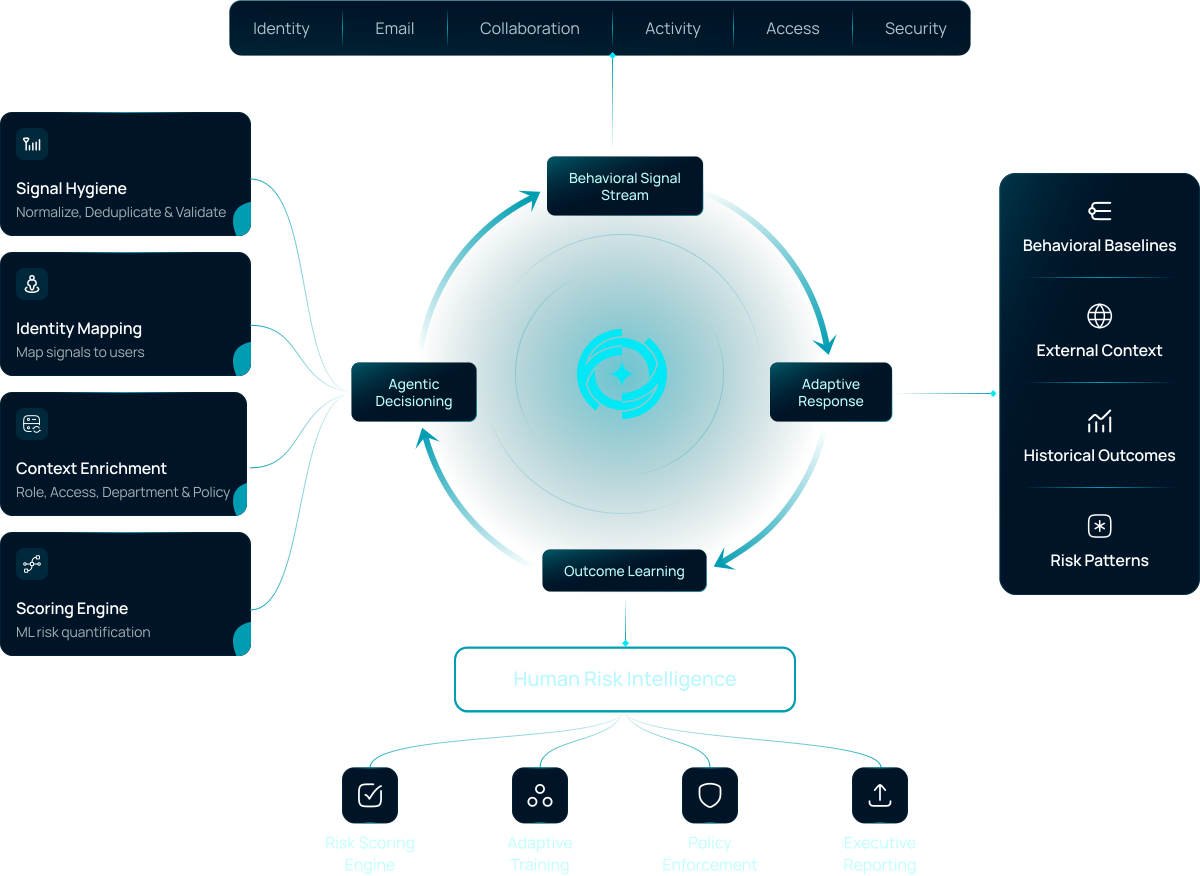
Autonomous Human Risk Orchestration Engine
Fraus ingests security and behavioral signals into its Autonomous Human Risk Orchestration Engine — creating individual human risk profiles and a collective organizational risk model that continuously shapes your organization-wide Human Risk DNA.
Works With the Tools Your Teams Already Use
Fraus connects to the identity, collaboration and security platforms already in place, so human risk data sits alongside the rest of the security stack.
Entra ID
Teams
Google Workspace
Microsoft 365
CrowdStrike
Sentinel
What Security Leaders Say About Fraus
Fraus helps organizations move beyond awareness training delivering measurable reductions in human cyber risk through intelligent automation.
Faster Targeted Intervention
3X
“Fraus helped us move beyond manual awareness campaigns with continuous, behaviour-driven risk reduction and targeted interventions.”
Yousef Al Harbi
Group SOC Manager
Fewer Repeat Human Risk Events
79%
“What stood out was the shift from one-time training to continuous human-risk reduction. Fraus gives us targeted intervention, measurable progress, and far less manual effort.”
Khalid Al Nuaimi
Head of Cybersecurity
“What impressed us most was how Fraus adapts automatically. We no longer run manual phishing campaigns—risk reduction happens continuously.”
Faisal Al Qasimi
CISO of Tier 1 Bank
Training Completion Among High-Risk Users
81%
Increase in Suspicious Email Reporting
62%
Human Risk Intelligence Center
Research, analysis, and strategic insights on reducing human risk and operationalizing Layer 8 defense.
Picture a finance clerk opening the calendar before a Monday payment run. Between two real meetings sits an event nobody accepted, "Final Notice: Payroll Acknowledgment Required," with a link in the description, and nothing was clicked or downloaded to put it there. This is calendar phishing, and this post is for security awareness managers in the UAE and GCC who need to explain it to staff and test for it.
In short: Calendar phishing puts a fake event on a calendar through an invite file, so staff meet it inside a trusted app. Train people to treat unexpected invites like unexpected email, report them, and test them with realistic simulations.
How Calendar Phishing Works
Attackers email a calendar file, usually with the .ics extension, and the event can land on the recipient's calendar without any action from them, as an IT security notice from a New York college describes. Because the event sits inside an app people trust, and the invite can get past email filters, it is harder to spot than a message in a spam folder.
The event itself carries the lure. Titles borrow urgency from finance, such as an invoice, an overdue payment or a crypto purchase, and the description pushes the reader to click a link, open a file or call a phone number, as a university warning from October 2025 lays out. Some invites appear to come from the organization's own domain while the real sender is someone else.
That makes calendar invite phishing a different problem from the phishing email staff already learn to distrust. The reader never decides to open anything. The first decision they make is what to do with an event that is already there.
Why ICS Phishing Reaches Staff Unchecked
Many calendar apps can add invitations on their own, which is why these events often appear without the recipient doing anything, as the college notice puts it. So the setting that decides whether a fake invite appears at all often belongs to IT, not to the employee.
The New York college changed its domain-wide settings so that invitations from external senders staff had never interacted with no longer appear until they accept them. It still asked staff to set their own calendars to add invitations only if the sender is known. Settings cut the volume. A person still has to judge what remains, including invites that look like they come from inside the organization.
Attackers are also moving away from the inbox in general. The 2026 Verizon Data Breach Investigations Report reports that mobile social engineering, such as fake texts and voice calls, has a success rate 40% higher than traditional email phishing. A calendar event is another place outside the inbox where a lure can arrive, and an invite that asks the reader to call a number borrows the same phone-based pressure.
What Malicious Meeting Invitations Look Like
The warnings from the college and the university list the same few signs. Staff can check them in seconds:
An organizer they do not know, or a familiar name with an address that does not match
Money words in the title: invoice, overdue payment, payroll, crypto
Urgent wording such as "payment will be processed within hours"
A link or attachment that asks for login details
A phone number in the description
None of this needs technical knowledge. It needs a pause, and the pause is what training has to build, because an event already on the calendar feels as if someone has accepted it.
Train Staff to Spot Fake Invites
Teach the report path first. Both institutions tell staff not to click links, open attachments or call numbers in an unexpected event, and to report it as spam before deleting it. Staff need that exact sequence in the language they work in, on the calendar they use. Codex delivers micro-learning in Arabic and English for this kind of habit.
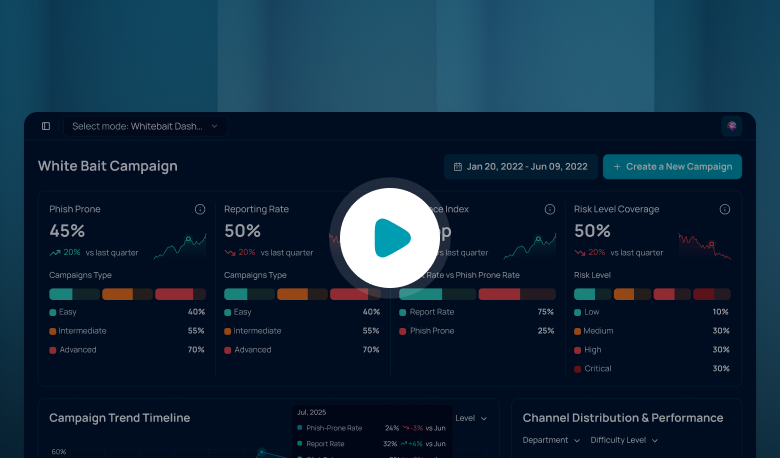
Simulate the channel. Training explains the risk. A simulation shows what people do when an invite appears on a Monday morning. Whitebait runs phishing simulation for UAE and GCC organizations in Arabic and English and tracks the reporting rate next to the click rate, which is the pair of numbers to read after an invite test. Base the invite on a real example from a public warning.
Match the lure to the role. A finance clerk sees invoice and payment invites, an HR officer sees payroll acknowledgements, and an executive assistant who manages other people's calendars accepts invites all day. Each role needs its own version of the test.
Calendar invites are one of several places where a fake request arrives inside a trusted app. Our post on fake helpdesk chats in workplace messaging covers one of the others, and the post on AI phishing attacks covers how better written lures change what employees see.
Run One Calendar Test This Month
Go back to the finance clerk's Monday. Ask IT whether invitations from unknown senders add themselves to calendars in your organization, and set the known-senders rule if you can. Then send one simulated invite to a single team and compare how many people report it with how many click. The result shows which team needs training first.
Frequently Asked Questions
What is calendar phishing?
Calendar phishing uses a calendar invite, often an .ics file, to place a fake event on a victim's calendar. The title creates urgency, and the description holds a link, an attachment or a phone number. Because the event appears inside a trusted app, staff may trust it more than a suspicious email.
Can a malicious invite do harm without a click?
The fake event can appear without any action from the recipient, but the harm starts when someone clicks a link, opens an attachment or calls the number in it. Staff who leave the event alone and report it have avoided that lure, which is why reporting habits matter more than spotting every invite.
How can IT reduce calendar invite phishing?
Check whether your calendar platform adds invitations automatically and which option it uses. Where it is available, limit automatic additions to known senders so that events from strangers do not appear until someone accepts them. Administrators can often apply this across the whole organization, as the New York college did for external senders.
What should an employee do with a suspicious invite?
Do not click links, open attachments or call numbers in the event. Report it as spam using the calendar's report option, then delete it. If they already clicked or entered credentials, they should reset the password at once and contact the security team.
How do you test staff for ICS phishing?
Send a simulated invite with a realistic title and link to a small group chosen by role, such as finance or HR. Measure how many people report it next to how many click, then repeat with a different lure so staff learn the pattern and not one wording.
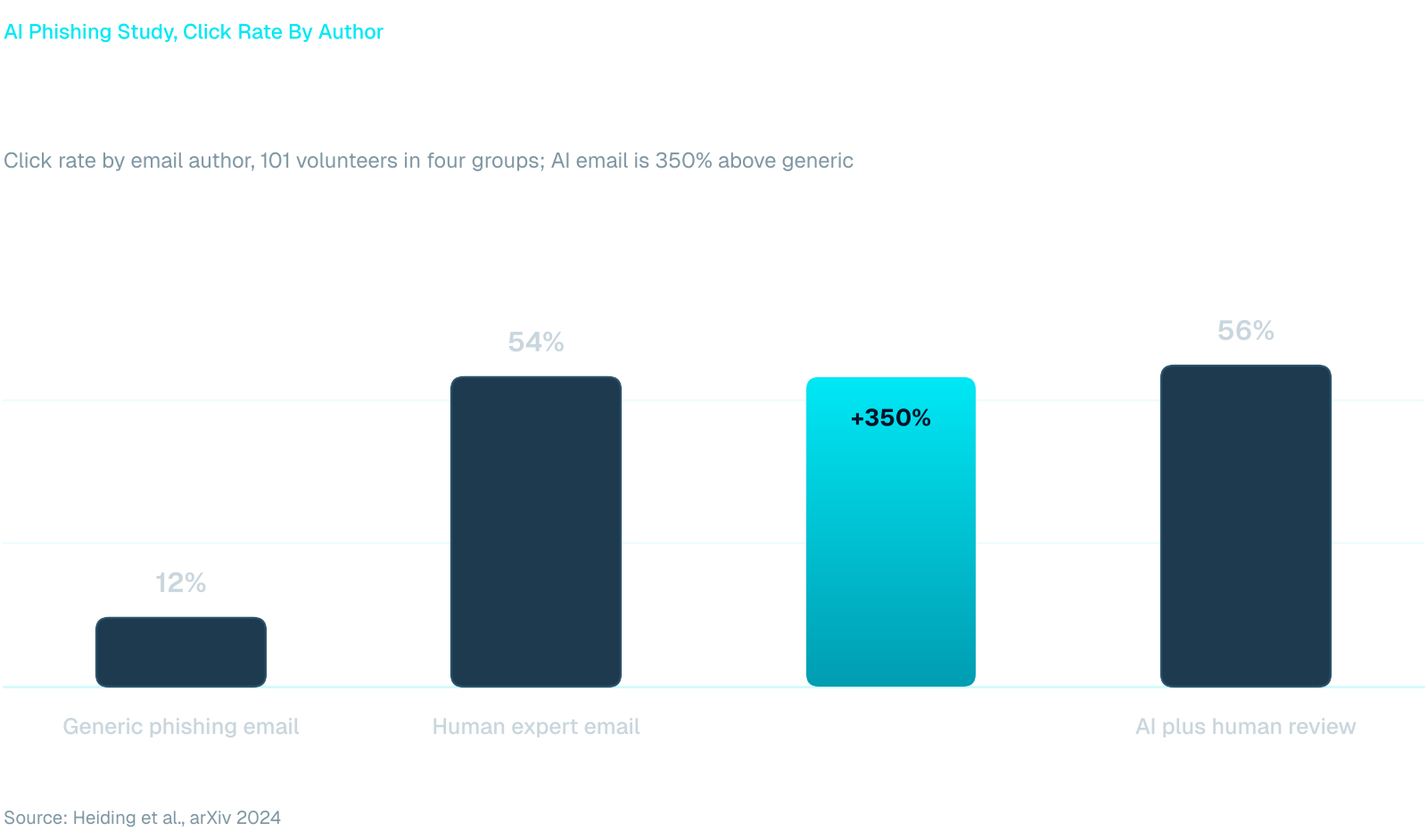
In a phishing study with 101 volunteers, run by a team that included authors from Harvard Kennedy School, emails written by an AI agent got a 54% click rate, the same as emails written by human experts. This post is for CISOs and security leads who need to explain what AI phishing attacks change and how to train staff for them. The study dates from late 2024, and the tools have not stood still since.
In short: AI-powered phishing removes the typos and clumsy wording employees were taught to spot. Train people to check the request, the sender and the channel instead, and test them with current, personalized lures that change as the attacks do.
What AI Phishing Attacks Change
Quality, every time. The UK's National Cyber Security Centre assessed in January 2024 that generative AI can already produce lure documents without the translation, spelling and grammar errors that often expose phishing, and expected this to increase over the following two years (NCSC assessment). The attack is still a lure that asks for a click, a login or a payment. What changes is that it now arrives well written.
In the Harvard Kennedy School study, an AI agent searched the web for each volunteer's interests, professional background and collaborators, then wrote an email around them. Those emails reached a 54% click rate, level with the human experts, and AI emails reviewed by a person reached 56%. A generic phishing email used as the control reached 12% (Heiding et al., 2024).
The sample was small and university-based, so read the numbers as a direction for your own testing, not a forecast. The cost side points the same way: the authors estimated about four cents in API costs per AI-generated email. Writing a personal lure no longer takes an attacker an afternoon.
Why the Old Red Flags Fail
Most awareness material still lists spelling mistakes, odd grammar and a generic greeting as warning signs. The UAE Cyber Security Council's December 2025 public advice still tells people to look for spelling or language errors. In the same messages it warns that criminals use AI to impersonate individuals and institutions with growing realism (Gulf News report). A message can pass the spelling check and still be hostile.
The NCSC went further and warned that generative AI will make it hard for everyone to spot phishing, spoofing or social engineering attempts, regardless of their cybersecurity knowledge. For staff who read both Arabic and English, translation slips were one more tell, and those are among the errors the NCSC says AI removes.
That moves the useful question from “does this look wrong?” to “should this request exist?”. A change of bank details, a login prompt behind a link, a request to keep something quiet and a demand for speed stay suspicious however well they are written. The Council's April 2026 awareness campaign makes a similar point when it calls the human element the most critical component in cybersecurity (Gulf News report).
Training for AI-Powered Phishing
Training that works against AI-written lures teaches a short routine employees can run in the few seconds they have. It does not depend on the message looking odd.
Ask who is writing, and whether they normally contact you through this channel.
Look at what is requested: money, credentials, secrecy or speed.
Confirm through a second channel you already trust, never the one inside the message.
Report the message, including when you have already clicked.
Simulations need to move the same way. A fixed template library written two years ago still tests the old red flags. Whitebait runs AI-recommended campaigns in Arabic and English, and Dolus AI Studio turns a screenshot of a real suspicious email, or a short prompt, into an editable template, so the lure that reached your staff this week can become a simulation template.
For the roles you rate as most exposed, Blackbait runs OSINT reconnaissance on selected targets and escalates attacks autonomously. That is closer to what the study's AI agent did than a broadcast campaign is.
Measuring Generative AI Phishing Readiness
A click rate on its own says little once the lures look clean. Track the reporting rate next to it, along with how long reports take and whether the same people repeat the same mistake. The method in Phishing Simulation UAE: What to Check Before You Buy shows what to ask of any platform, including whether it tracks reporting rate next to click rate.
Difficulty should follow the person, not the calendar. Our post on adaptive phishing simulations covers how to raise or lower the challenge by role and past behavior, which is how a program keeps pace with attackers who personalize.
Next Step for Security Leaders
Take the lure your own staff reported most recently and check whether it contains a single spelling mistake. If it does not, your simulations should not either. Rebuild that lure as a template, send it to one department, and compare the reporting rate with your last campaign. The gap between that result and your old template is the size of the problem.
Frequently Asked Questions
Can employees still spot AI-generated phishing emails?
Sometimes, but not by looking for mistakes. The NCSC expects generative AI to make phishing, spoofing and social engineering hard for everyone to spot, whatever their cybersecurity knowledge. Employees do better when they check the request itself: who is asking, what they want, and whether it can be confirmed through a second channel they already trust.
What is generative AI phishing?
It is phishing in which a generative AI model writes or personalizes the lure and sometimes researches the target. In the Harvard Kennedy School study, an agent built profiles from public web sources and wrote each email around them. The goal is unchanged: a click, a login or a payment. The writing is faster, cheaper and cleaner.
Do we need new training for AI-powered phishing?
Keep the fundamentals and change the examples. Replace error-spotting with request checking, refresh lures so they match what attackers send now, and set difficulty by role. Deliver it in the languages your staff work in, and measure reporting and repeat behavior, not only whether people clicked.
The FBI has warned that attackers are emailing a short code and telling the reader to enter it on a real Microsoft page. Device code phishing works because nothing on that page is fake, which is why it slips past the habits most employees have learned. This post is for SOC leads and security awareness managers who need to explain the lure in plain terms.
In short: A device code lure asks you to type a code, sent by someone else, into a genuine Microsoft sign-in page. That approves the attacker's device, not yours. Employees should never enter a code they did not request themselves, and should report the message.
How the Device Code Lure Works
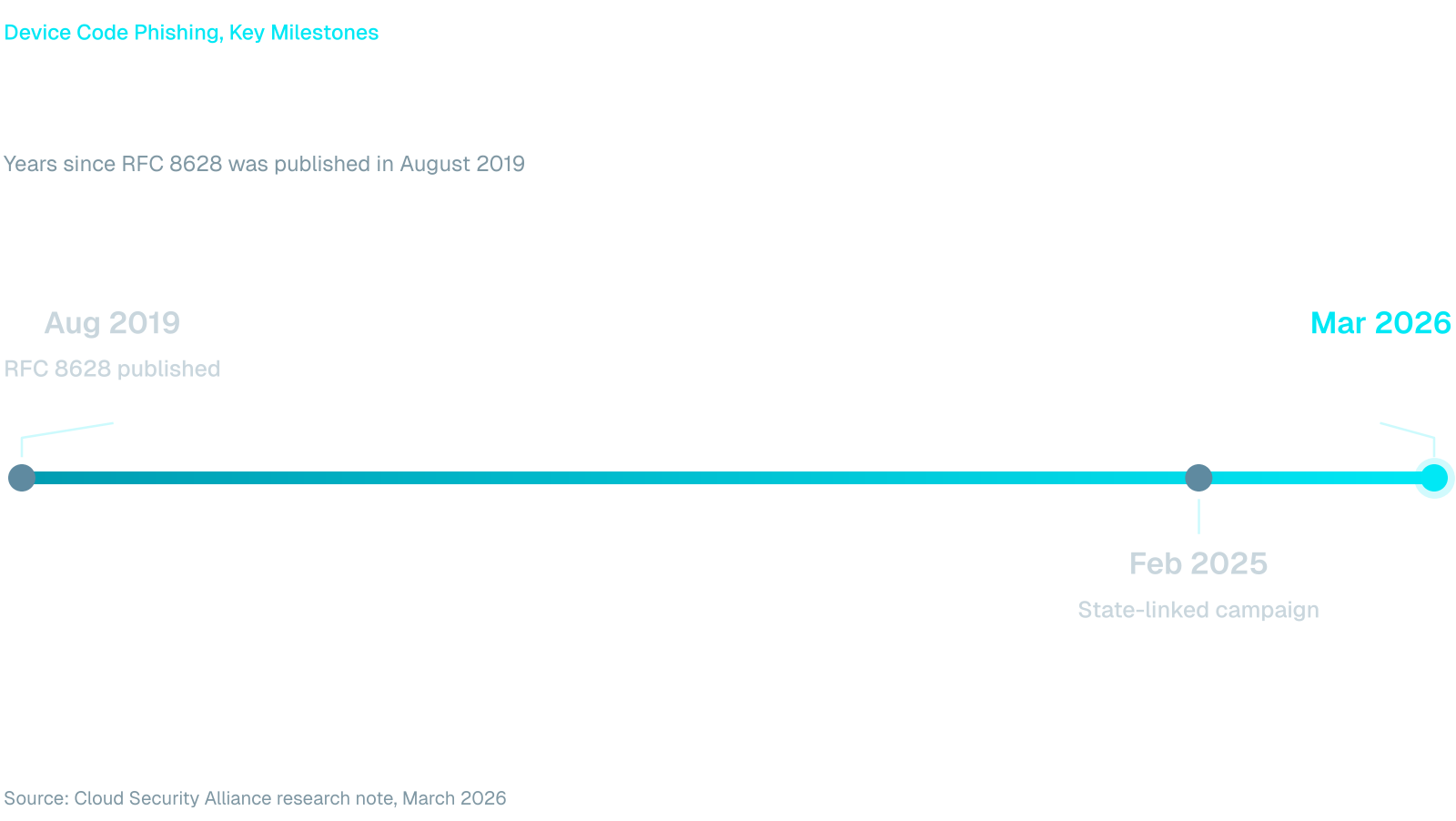
Device codes exist for devices that are awkward to type on. A smart TV or a printer shows a short code, and you enter it on a phone or laptop to approve the sign-in. The standard behind it, RFC 8628, published in August 2019, warns that the flow can be started on a device in an attacker's possession.
OAuth device code phishing turns that design against the user. It runs in four steps:
The attacker asks Microsoft for a device code, which expires after about 15 minutes.
A message gives the code to the target with a reason to enter it, such as a shared document, an invoice, a meeting ID or a security check.
The target opens the real Microsoft device login page, types the code, signs in and approves MFA as usual.
The attacker's device receives access and refresh tokens and can read mail and files without ever seeing a password.
Email is only one route. CyberScoop reported in February 2025 that a campaign attributed to a suspected Russia-aligned group, aimed at governments and organizations in regions that included the Middle East, built rapport over messaging apps such as Teams, WhatsApp and Signal, then sent fake Teams meeting invitations that presented the code as a meeting ID.
Why Microsoft 365 Device Code Phishing Works
Most awareness advice tells people to check the address bar and distrust unfamiliar login pages. In Microsoft 365 device code phishing the address bar is correct and the page belongs to Microsoft. The employee follows the advice and still hands over access.
The FBI describes a phishing-as-a-service kit that captures access and refresh tokens and gets around MFA without intercepting the user's credentials, because the victim approves the sign-in themselves. In May 2026 Australia's national cyber agency said it had received a number of reports of the same activity against Microsoft 365 users, as Information Age reported.
The scale is already large. A research note from the Cloud Security Alliance reports 340 or more Microsoft 365 organizations in five countries hit by one phishing-as-a-service campaign by mid-March 2026, across construction, manufacturing, financial services, healthcare and local government. That is less than seven years after the device code standard was published.
That scale explains why response matters as much as prevention. The same research note says a password reset alone does not end access, because the stolen refresh token keeps working until sessions are revoked.
What Employees Should Never Enter
Give people a rule short enough to remember at their desk, and put it where they sign in:
Never enter a code on a Microsoft page that someone else sent you, whatever the message calls it: one-time password, access code, verification token or meeting ID.
Never approve a sign-in you did not start yourself.
Treat any request to verify a document, invoice or meeting by typing a code as a lure, even when the page is real.
Report the message instead of replying, and say whether you already entered a code.
The last line matters most to the SOC. An employee who reports within minutes gives your team time to revoke sessions and review registered devices, mail forwarding rules and OAuth consents, which are the response steps the Cloud Security Alliance note lists.
Device Code Phishing Awareness in Practice
Knowing the rule is different from applying it when a message appears to come from a finance director on the day of a payment run. A phishing simulation that asks employees to type a code or approve a sign-in shows you who stops and who reports. Whitebait runs MFA bypass scenarios in Arabic and English and tracks reporting rate next to click rate, which tells you whether the rule held.
Role matters here. Finance staff, executive assistants and help desk teams handle the documents and meeting invites that lures imitate, so they should see harder and more frequent scenarios. Add short training in Arabic and English through Codex, and give people a one-tap way to report from inside Microsoft Teams with the Fraus Teams App. The chat version of this pattern is covered in Microsoft Teams phishing.
Controls That Back the Rule Up
Awareness works best next to configuration. The FBI recommends a conditional access policy that blocks device code flow for all users, with narrow exceptions for documented business needs, and an audit of current use first so legitimate dependencies are found.
Blocking the flow removes the lure's payoff. Training then covers the cases the policy cannot, such as an exception you had to keep or a different sign-in prompt built on the same trick.
A Practical Next Step
Picture the accounts payable clerk who receives a message asking for a code to open an invoice. This week, ask your identity team whether anyone still uses device code sign-in, and send employees the four-line rule above.
Then schedule a simulation for the roles most exposed and compare reporting rate with click rate after the first round. That gives you a number to take to the next security review.
Frequently Asked Questions
What is device code phishing?
It is an attack that abuses the device sign-in feature. The attacker starts a sign-in on their own device, then convinces a victim to enter the matching code on the real Microsoft page. The victim's approval gives the attacker tokens for the account, with no fake website involved.
Does MFA stop device code phishing?
Not on its own. The victim completes MFA while approving the attacker's request, so the prompt is genuine. The FBI notes the kit it describes gets around MFA without intercepting the user's credentials. Blocking device code flow with a conditional access policy removes the payoff for most users.
Is device code phishing a Microsoft vulnerability?
No. The Australian Signals Directorate said it is not a technical flaw in Microsoft systems, as Information Age reported. Attackers abuse the legitimate Microsoft login page. The feature works as designed, which is why user behavior and policy controls both matter.
What should an employee do after entering a code?
Report it to the security team immediately and do not wait to see whether anything happens. The SOC can revoke the account's sessions, check for new registered devices and mail forwarding rules, and review OAuth consents. A password change alone will not remove the attacker.
See Human Risk Clearly. Reduce It Continuously.
No manual setup. No noisy training. Just measurable human risk reduction.


.svg)





.svg)


.svg)
.svg)

.svg)


.png)
.png)

.png)


.svg)


.svg)
.svg)

.png)








.png)
.png)

.png)
.png)