




In December 2025, Abu Dhabi Police warned residents about fake QR code stickers placed on payment devices and parking meters. In January 2026, the FBI described a state-sponsored group putting QR codes inside emails to slip past filters. Both are QR code phishing, and this post is for security awareness managers in the UAE who need to know what staff will face and how to test for it.
In short: QR code phishing moves the attack from a visible link to an image scanned on a personal phone, where email filters and network controls cannot see it. Test it with realistic QR lures, track who reports them, and coach people at the scan.
How QR Code Phishing Works
QR code phishing, also called quishing, hides a web address inside an image. The victim scans it with a phone, the phone opens the link, and a fake page asks for a card number or a password. Nothing in the image reads as a link, so tools that inspect the text of an email have little to check.
The FBI advisory of January 2026 sets out the enterprise version. It covers campaigns by a North Korean state-sponsored group and says a link hidden in a QR code can evade URL inspection, rewriting and sandboxing. Scanning also moves the victim onto a mobile device outside corporate endpoint and network inspection.
The advisory adds that the fake sign-in pages are tailored to the device, and that stolen session tokens can be replayed to get past multi-factor authentication. For a security team, that makes the scan itself the moment to catch. By the time a password is typed, the attacker may already hold a working session.
QR Phishing Examples Staff Meet
Start with what has been reported in the UAE, because those are the lures your staff are most likely to recognize when they see them again in a test.
Stickers in public places. Abu Dhabi Police warned on 17 December 2025 that scammers place stickers that look like official payment codes on payment devices, parking meters and dashboards. Scanning one opens a fraudulent website that asks for card details or personal data.
Codes on walls. In October 2025, Dubai Municipality warned residents that every QR code they scan could be fraudulent and told them not to scan codes on walls or in public places out of curiosity.
Codes that arrive with a story. The US Federal Trade Commission has described unexpected packages with a note telling the recipient to scan a QR code to find out who sent the gift. The scan can lead to a phishing site or a malware download. A parcel at reception or a printed notice outside a meeting room can carry the same trick into an office.
Codes in email. The FBI advisory describes QR codes sent as attachments or embedded images, from spoofed senders such as an embassy employee, including a fake conference invitation sent to a strategic advisory firm.
Knowing these four patterns is a start, but recognizing them on a busy morning is a different skill, and research shows how wide that gap is.
Why Employees Miss Quishing
A 2025 study at the USENIX Security Symposium tested 1,876 online participants across three experiments that simulated online shopping and payments. The authors come from Ruhr University Bochum, Leibniz University Hannover and Maastricht University.
In the payment experiment, 54% of participants whose email showed fraudulent bank details as text used them, while 87% of those who got the same request as a QR code did. Only 13% recognized the fraudulent QR payment request, against 46% with the typed details.
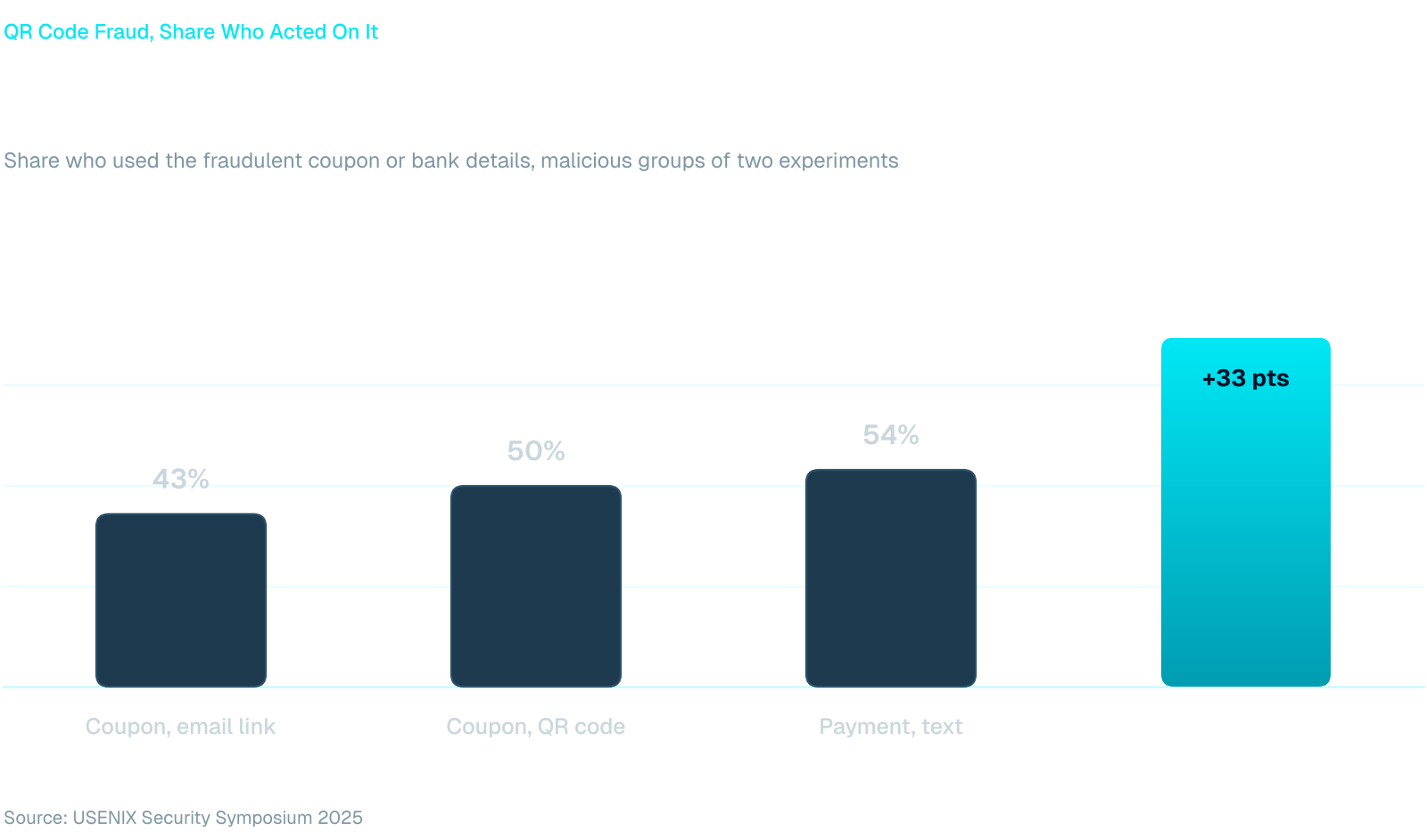
In the shopping experiment, 43% of participants used a phishing coupon from an email link and 50% used it from a QR code. Among participants who explained their choice, only 2 of 58 in the QR group said they recognized the phishing attempt, compared with 26 of 71 in the link group. Participants who did not believe a QR code could carry malicious content were also less likely to spot the forgery.
For a program built on annual, generic reminders, that is a hard result. A rule such as "check the link before you click" gives a person nothing to check when the link is an image. Practice with the actual format, per person and repeated, is what builds the habit.
QR Code Phishing Awareness Through Simulation
A QR code simulation puts a realistic code in front of an employee through the channel an attacker would use, then records whether they scan, whether they enter anything and whether they report it. Whitebait runs QR code and credential harvesting scenarios in Arabic and English and tracks reporting rate next to click rate, which gives you the number that shows awareness growing rather than only exposure.
Build the lure from the examples above. A payment or parking code suits staff who handle car park and visitor access, a parcel notice suits reception and facilities, and a document or sign-in request suits finance teams and executive assistants. Write each one in the working language of the group that will receive it.
Brand and legal. Use your own company name or an invented brand, not a real bank, ministry or police authority. Impersonating a public body in a test can alarm staff and the public. A code that is printed and placed in a building should be agreed with HR, facilities and legal first, and the landing page should record that credentials were entered, never the credentials themselves.
Reporting route. Decide before launch where a suspicious code is reported, and keep it to one step from the phone or the desk. Clear reporting procedures for suspicious QR codes are among the FBI's recommended mitigations. For teams working in Microsoft Teams, the Fraus Teams App gives staff one-tap phish reporting inside Microsoft Teams.
Coaching at the scan. When someone scans and enters details, Zero-Touch Training responds at once with training matched to the behavior, delivered inside Microsoft Teams, so the lesson arrives while the lure is still fresh.
Frequency. Treat QR scenarios as one lure type in a continuous program, not a yearly event. Let each person's results set the pace: someone who scans and enters details sees another QR lure sooner than someone who reported the first one. Our guide to phishing simulation in the UAE covers how to set that up.
Run Your First QR Test
Go back to the car park sticker. A first test that mirrors it can be small and still tell you where your people stand.
- Pick one role group, such as reception and facilities, or finance.
- Choose one lure from the examples above and write it in the group's working language.
- Agree the sign-off with HR, facilities and legal, and name the reporting route.
- Launch, then read scan rate, credential entry, reporting rate and time to report separately.
- Coach everyone who scanned, and send a harder lure to the people who reported the first.
That gives you a baseline for each role, and a second round shows whether the coaching changed what people do with the next code they meet.
Frequently Asked Questions
How often should we run QR code phishing simulations?
Often enough that QR lures are a regular scenario among your others, not a yearly event. Set the pace by risk. People who scan and enter details should see the next QR lure sooner, and people who report it can move on to a harder one. Track reporting rate and time to report alongside the scan rate.
What should the reporting route be when someone scans a QR lure?
Use the same single route as for email phishing, reachable from the desk and the phone. Anyone who scanned a real code and entered credentials should also change the password and tell the security team, so active sessions can be ended. The FBI recommends clear reporting procedures for suspicious QR codes.
What are the legal and brand considerations for QR simulations?
Use your own brand or an invented one rather than a real bank, ministry or police authority. Agree the scenario with HR and legal, and with facilities if a code will be printed and displayed. Store only the fact that credentials were entered, tell employees the program exists, and write the rules into your program charter.